

Kwikset Halo Wi-Fi Smart Lock Review: Keyless Entry With Built-In Connectivity
The Kwikset Halo Wi-Fi Smart Lock is a keyless entry touchscreen deadbolt designed for front doors, and it sits at the intersection of two trends in home security: eliminating physical keys and connecting the door to the rest of a smart home. What separates the Halo from many smart deadbolts is that its Wi-Fi is built directly into the lock. There is no separate hub or bridge to purchase or plug in, which means the lock itself is the device that talks to your network and, through the Kwikset app, to you. For anyone who has priced out a smart lock only to discover that remote access requires an extra piece of hardware, that distinction matters.
This review walks through what the Halo offers based on its stated features: how it is designed, how it works day to day, what its app and voice control can do, and who is likely to get the most out of it.
Design and Build
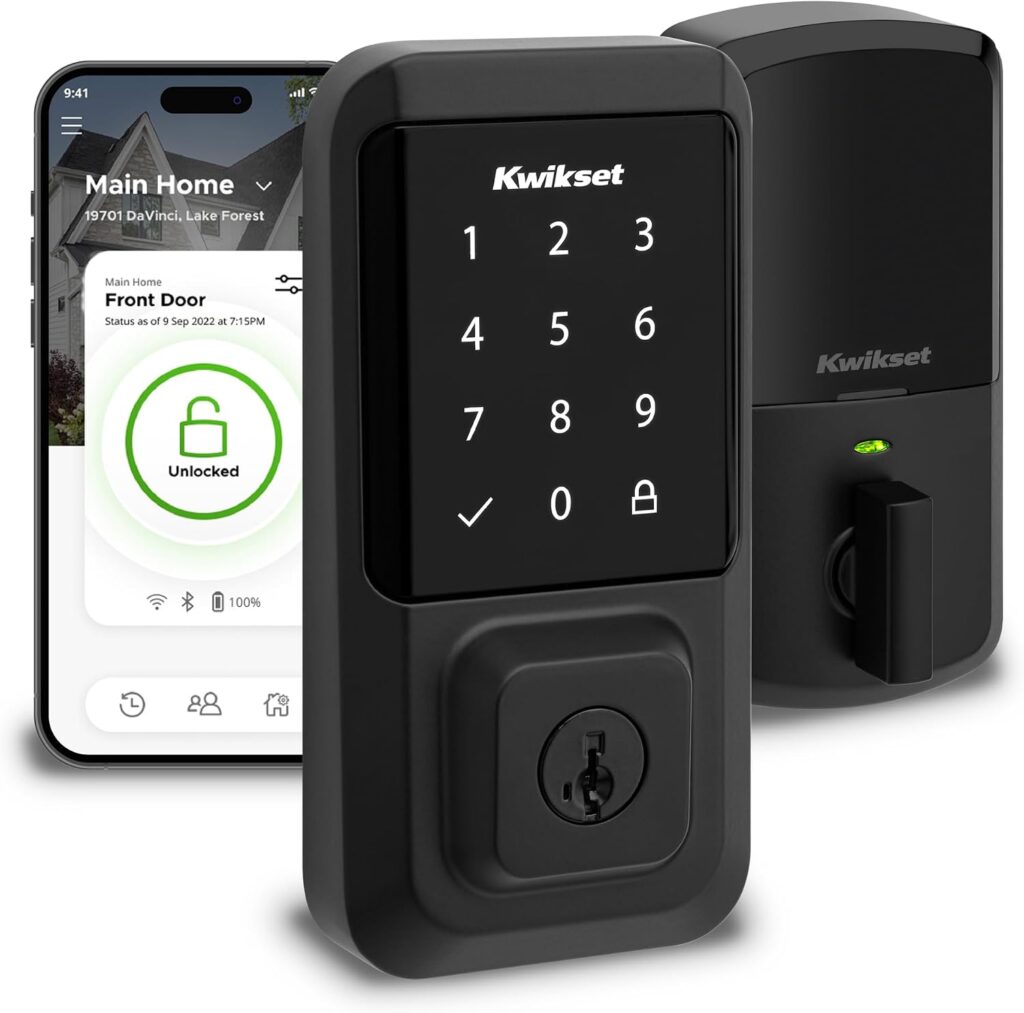
The Halo is a deadbolt replacement rather than a full handle set, and it is finished in matte black. The front-facing interface is a backlit touchscreen keypad rather than a set of physical buttons, which gives the lock a clean, modern look and keeps the entry point flush. Because the keypad is illuminated, entering a code in low light is part of the intended experience rather than an afterthought.
Installation is positioned as a do-it-yourself job. According to the product information, the guided setup and installation require only a screwdriver and can be completed in minutes. The lock fits doors between 1-3/8″ and 1-3/4″ thick, and the deadbolt backset is adjustable from 2-1/8″ to 2-3/4″. Those two measurements are worth checking against your existing door before buying, since they determine whether the Halo drops into the existing bore holes or requires modification. Kwikset backs the lock with a lifetime mechanical and finish warranty and a one-year electronics warranty, with full details available in the Kwikset warranty documentation.
Features and Technology
The core feature set revolves around removing keys from the equation. You can unlock the door through the Kwikset app or by entering a code on the touchscreen. The keypad supports up to 250 access codes, which is a substantial number for a residential lock and opens up possibilities beyond the immediate household.
Code management is handled through the app. From there, you can create temporary, scheduled, or permanent access codes and share them with family members and guests. A temporary code for a dog walker, a scheduled code for a cleaner who arrives on set days, or a permanent code for a family member are all managed in the same place rather than being programmed at the door.
Geofencing adds another layer of convenience. When enabled, the lock can automatically unlock as you approach your home, so arrival does not require pulling out a phone or tapping in a code. Auto-lock works in the opposite direction: you can set a duration after which the door locks itself following entry or exit. That is a hands-free safeguard for anyone who tends to be carrying groceries, wrangling children, or simply rushing.
Smart home integration covers Amazon Alexa and Google Home, allowing voice control of the lock and the creation of automations. The app also provides an event log and real-time notifications, including alerts for intrusion attempts such as invalid code attempts or lock tampering. For households that want visibility into comings and goings, the notification and history features are the practical backbone of the system.
Performance and Everyday Experience
In daily use, the Halo is built around a few recurring moments: leaving the house, arriving home, and letting someone else in. Each of those is addressed by a different feature. Leaving is covered by auto-lock, which can be configured to lock the door automatically after a set duration. Arriving is covered by geofencing, the app, or the touchscreen. Letting someone else in is covered by access codes, which can be temporary, scheduled, or permanent.
The notification system is where the lock shifts from convenience to awareness. Real-time alerts for lock activity, including invalid code attempts and tampering, mean the app functions as a monitoring layer rather than just a remote control. The event log lets you review activity after the fact, which is useful for confirming that a guest actually locked up on the way out — one of the specific scenarios the product information highlights.
Because the lock connects directly over Wi-Fi, remote lock and unlock through the Kwikset app do not depend on a separate hub being online. That simplifies the setup and removes a potential point of failure from the system, though it also means the lock relies on your home Wi-Fi network being available for remote functions.
Connectivity and Compatibility
The Halo is a Wi-Fi enabled smart door lock that requires no hub. It works with Amazon Alexa and Google Home for voice control and automations. Control and management happen through the Kwikset app, which handles remote lock and unlock, guest access sharing, activity history, code creation, auto-lock duration settings, and notifications. Geofencing is enabled through the same app.
On the hardware side, compatibility comes down to door dimensions: the lock fits doors from 1-3/8″ to 1-3/4″ thick, with an adjustable deadbolt backset between 2-1/8″ and 2-3/4″. Installation is stated to require only a screwdriver.
Who Is This Product Best For?
The Halo suits households that want to stop carrying keys and manage entry from a phone. The 250-code capacity and the ability to issue temporary, scheduled, or permanent codes make it a reasonable fit for homes with regular visitors — cleaners, dog walkers, contractors, or extended family — where handing over a physical key is impractical or undesirable.
It is also a natural choice for anyone already using Amazon Alexa or Google Home who wants the front door to participate in voice control and automations. Renters or homeowners who want remote access without adding a hub to their network will find the built-in Wi-Fi particularly relevant. And for people who want visibility into who comes and goes, the event log and intrusion notifications provide that record directly in the app.
Anyone whose door falls outside the stated thickness or backset range should verify fit before committing, since those measurements are the gating requirement for installation.
Final Verdict
The Kwikset Halo Wi-Fi Smart Lock packages keyless entry, remote access, guest code management, voice control, and intrusion notifications into a single deadbolt that installs with a screwdriver and needs no hub. The feature set is broad but coherent: everything routes through the Kwikset app, and the hardware requirements are clearly stated so buyers can check compatibility up front. The lifetime mechanical and finish warranty paired with a one-year electronics warranty reflects the split between the mechanical lock and its connected components.
For households that want to ditch keys, share access flexibly, and keep an eye on the front door from a phone, the Halo covers those needs without extra hardware. The main considerations are the door dimension requirements and the reliance on your home Wi-Fi for remote functions. Within those parameters, it is a well-rounded option for a connected front door.